
The Data Churches Already Have (But Often Ignore)
How People Actually Watch Church Livestreams (And Why It Should Change Your Stream Settings)
Direct Answer
Most church livestream viewers watch on phones, not computers or TVs. Because of this, churches should optimize their stream settings for mobile viewing using 30fps frame rate and a bitrate between 1500–3000 kbps. These settings provide the best balance of quality, stability, and accessibility for the majority of viewers.
The Problem Most Churches Don’t Realize
Many churches assume people are watching their livestream on large screens.
So they configure their streams for:
- maximum video quality
- high bitrates
- high frame rates like 60fps
On paper that sounds like a great plan.
But the actual viewing data often tells a very different story.
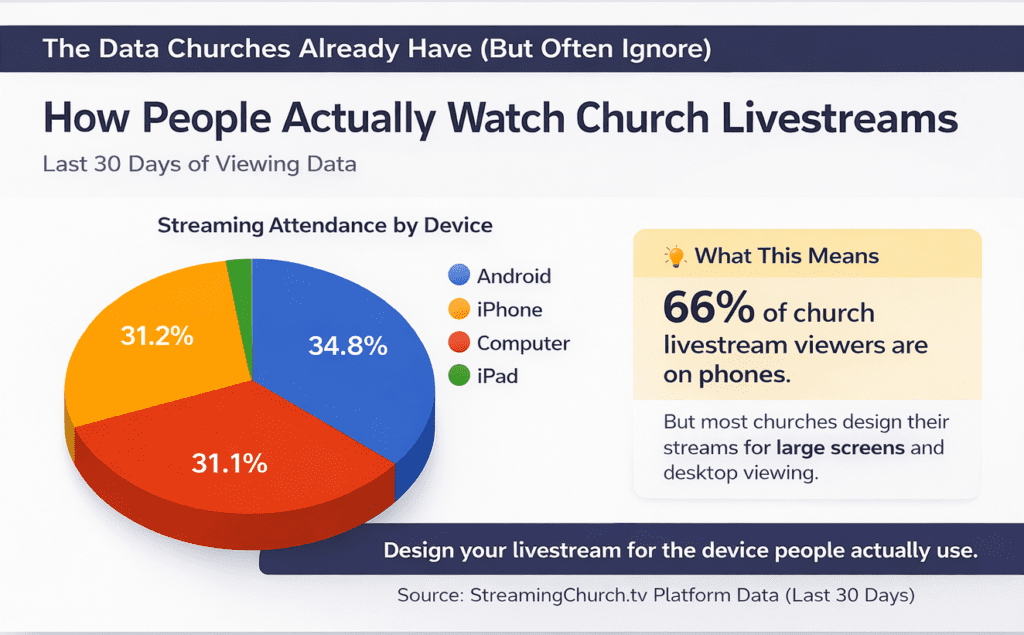
Inside the StreamingChurch.tv admin dashboard there is a report called:
Streaming Attendance by Device
And when we look at this data across churches, we see a consistent pattern:
Most viewers are watching on phones.
In many churches, 60–70% of viewers are on mobile devices.
That means many churches are optimizing their stream for the smallest part of their audience.
Why Device Data Should Influence Your Stream Settings
When viewers watch on phones, a few things matter much more than ultra-high video quality:
- Stream stability
- Lower buffering
- Efficient bandwidth use
- Compatibility with mobile networks
A church stream that looks perfect on a large monitor but constantly buffers on a phone creates a frustrating experience for most viewers.
This is why your bitrate and frame rate settings matter so much.
The Bitrate Mistake Many Churches Make
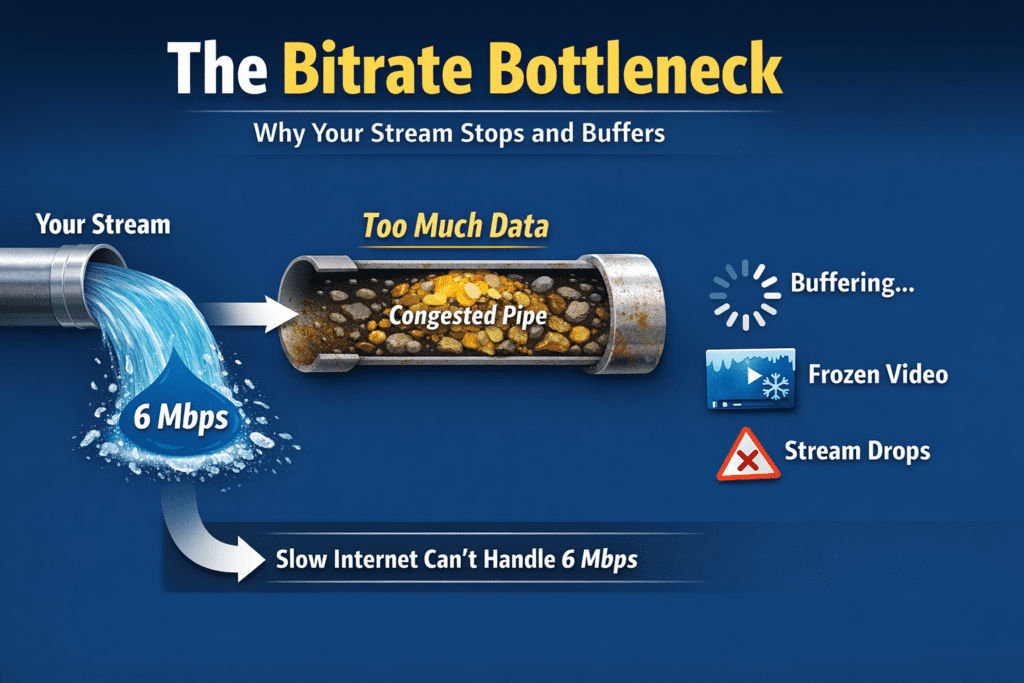
A common mistake churches make is streaming at very high bitrates.
Higher bitrate means:
- more upload bandwidth required from the church
- larger video streams for viewers to download
- higher likelihood of buffering for viewers with slower connections
Many churches simply choose the highest bitrate their encoder allows.
But if most viewers are on phones or slower internet connections, this can actually make the viewing experience worse.
A Better Bitrate Range for Church Services
For most churches, a bitrate between:
2 mbps and 4 mbps
provides excellent results.
This range:
- delivers clear video
- reduces buffering
- works well on mobile networks
- provides more consistent stream stability
In many cases, lowering bitrate slightly will improve the experience for more viewers.
The Frame Rate Setting Churches Often Get Wrong
Another common issue is frame rate.
Many streaming encoders default to 60 frames per second (60fps).
Because it sounds like a higher-quality setting, churches often leave it there.
But for church services, 60fps is usually unnecessary.
What 60fps Is Actually Designed For
60fps is primarily used for high-motion video, such as:
- sports broadcasts
- gaming streams
- fast-moving action content
These environments benefit from extremely smooth motion because objects move rapidly across the screen.
But church services are very different.
A typical church livestream includes:
- a pastor speaking
- worship leaders singing
- musicians playing
- minimal camera movement
This type of content does not require high-motion frame rates.
Why 60fps Uses More Bandwidth
A 60fps stream processes twice as many frames per second as a 30fps stream.
That means:
- larger video data streams
- more bandwidth required
- greater strain on the encoder computer
- more data for viewers to download
When many viewers are watching on mobile devices, that extra bandwidth can increase buffering and instability.
Why 30fps Is Ideal for Church Livestreams
For most churches, 30 frames per second (30fps) is the ideal frame rate.
30fps provides:
- smooth motion for speaking and worship
- reduced bandwidth usage
- more stable streaming
- better performance on mobile networks
And most viewers will not notice any difference in visual quality between 30fps and 60fps for a typical church service.
What they will notice is buffering.
The Stream Settings That Work Best for Most Churches
Based on real-world streaming data and experience with hundreds of churches, the following settings work extremely well for typical church services:
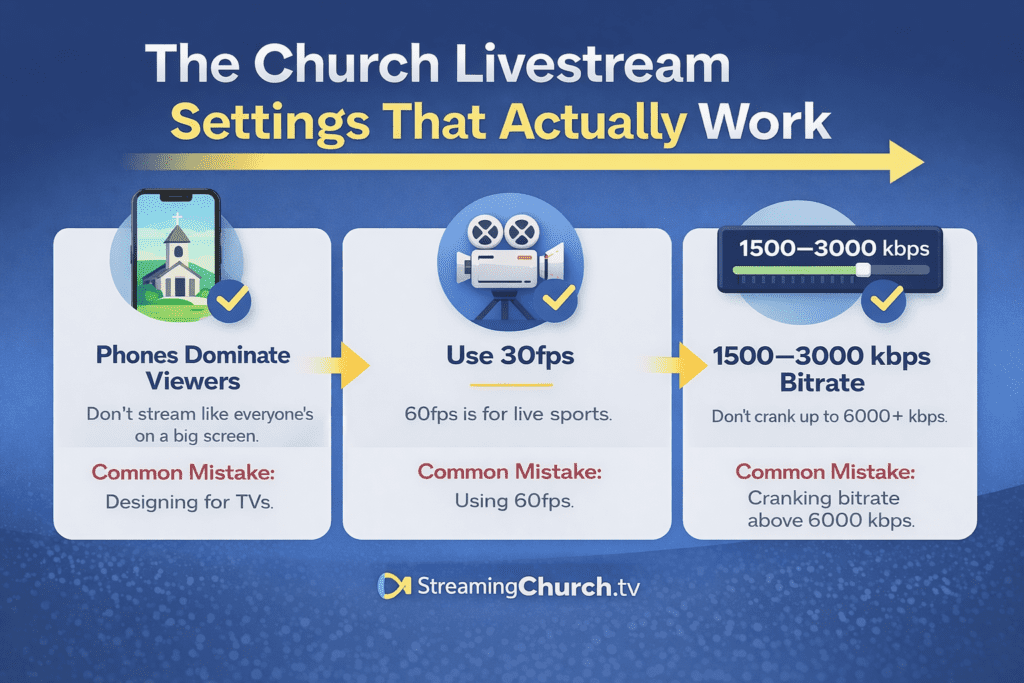
Resolution: 720p or 1080p
Frame Rate: 30fps
Bitrate: 1500–3000 kbps
This combination delivers:
- clear video
- stable streaming
- better mobile performance
- fewer buffering issues
Most importantly, it optimizes the stream for how people actually watch.
A Simple Tech Check for Your Church
Take two minutes this week and check three things.
1. Look at Your Viewer Device Data
Inside your StreamingChurch.tv dashboard:
Reports → Streaming Attendance by Device
See how many viewers are on:
- Android
- iPhone
- Computer
- Tablets
If phones dominate your audience, that should influence your streaming settings.
2. Check Your Encoder Frame Rate
Open your streaming encoder (OBS, Wirecast, vMix, or hardware encoder).
Confirm the frame rate is set to 30fps, not 60fps.
3. Check Your Bitrate
Look at your encoder output settings.
If your bitrate is extremely high, consider adjusting it into the 1500–3000 kbps range for better reliability.
The Key Principle
Design your stream for the device people actually use, not the device you imagine them watching on.
Sometimes the best upgrade for your livestream isn’t new equipment.
It’s simply using the right settings for your audience.
Questions? Reach out to StreamingChurch.tv, serving ministries since 2001.